🎉 Sent!
You made it to the top. Submit your work above!
Submission
Deliverable
Submit one notebook that includes:
- Loaded
protein_embeddings.pklcreated in Route 36A - Implemented
get_window_embedding(...)and tested it - Built reference-vs-sliding cosine similarity profile
- Built full window-vs-window cosine heatmap
- Wrote a short interpretation tied to UniProt annotations
Mission checklist
- Loaded generated embedding dictionary
- Extracted a window embedding
- Computed reference-vs-sliding cosine profile
- Plotted similarity profile with reference marker
- Computed full similarity matrix
- Plotted heatmap and interpreted biological signal
Exercise 4: Extra Credit Scale to More Proteins
- Repeat Exercises 2-3 for at least 2 additional proteins
- Compare qualitative heatmap patterns across proteins
- Add one hypothesis for why patterns differ biologically
Exercise 3: Full Cosine Heatmap Window vs Window
- Pick the same protein you used in Exercise 2
- Use window size
10 - Precompute all window embeddings, then compute all pairwise cosine similarities
- Plot heatmap:
- X-axis: window start position
- Y-axis: window start position
- Color: cosine similarity
- Interpret:
- diagonal behavior
- off-diagonal blocks/bands
- one plausible link to UniProt domain/function notes
Exercise 2: Reference vs Sliding Cosine Profile
- Choose one protein from your dictionary (prefer
L >= 120) - Set
window_size = 5 - Set
ref_pos = L // 2 - Compute cosine similarity between reference window and all valid sliding windows
- Plot profile with a vertical line at
ref_pos - Write 2-4 sentences interpreting the shape of the profile
Exercise 1: Build Window Embedding Function
Implement:
get_window_embedding(emb_dict, uniprot_id, start_pos, window_size)
Requirements:
- Slice
[start_pos : start_pos + window_size] - Mean-pool residues in that slice
- Return shape
(1280,)
Required test:
- Pick one ID from your dictionary
- Use
window_size = 5 - Use
start_pos = min(50, L - window_size) - Print shape and short preview values
Exercise 0: Load Embeddings from Route 36A
You must complete Route 36A first.
Load your generated file:
import pickle

with open("protein_embeddings.pkl", "rb") as f:
    emb_dict = pickle.load(f)

print(type(emb_dict), len(emb_dict))
for k in list(emb_dict.keys())[:3]:
    print(k, emb_dict[k].shape)
Checks:
- Object is a dictionary
- Multiple proteins are present (target 10-20)
- Each value has shape
(L, 1280)
If you do not have this file yet, complete Route 36A first.
Intro
This route is the second half of the PLM practice final prep.
You already generated residue-level embeddings in 36A. Now you will analyze local regions by sliding windows and cosine similarity.
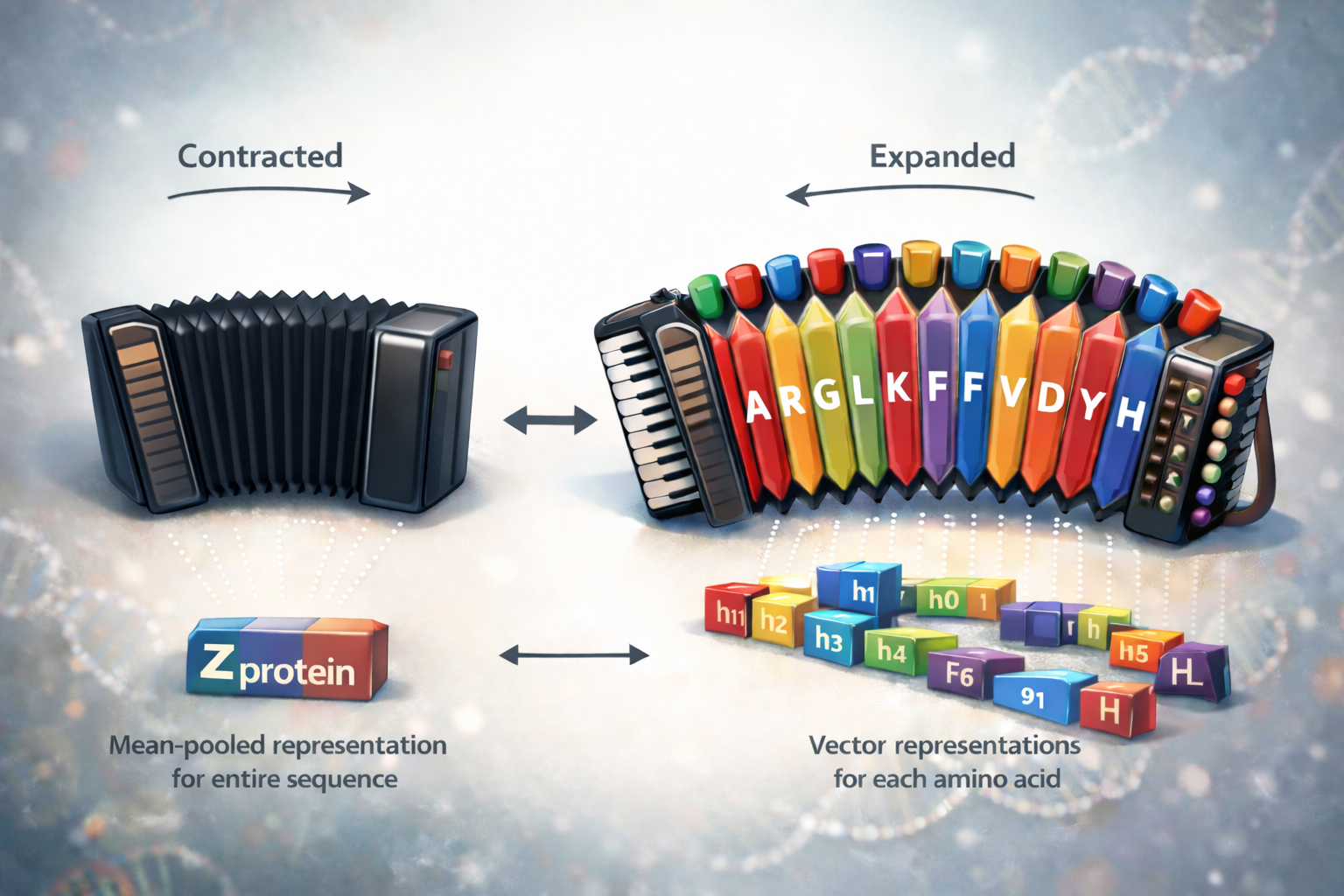
The core move is the accordion idea:
- residue embeddings are the expanded representation
- mean pooling contracts local windows
- cosine similarity compares local regions across the protein
Route 036B: Residue-Level PLM Cosine Analysis
- RouteID: 036B
- Wall: Protein Representations (W05)
- Grade: 5.10a
- Routesetter: Course Staff
- Time: ~45-60 minutes
- You'll need:
protein_embeddings.pklfrom 36A, notebook runtime, plotting, and UniProt lookup.
🧗 Base Camp
Start here and climb your way up!